Let's Upgrade Your Betting Experience!
Supercharge your bet tracking with access to the Google Chrome Extension plus more premium tools to make tracking easier, smarter, and faster.
What's included:
- Access to the powerful Google Chrome Extension
- Access to the Back/Lay Calculator
- Downloadable PDF Bet Reports with profit breakdowns and performance insights

Free with Bonusbank Premium
Bonusbank premium members get full BetTrackr Premium access at no extra cost. Link your account on the Bonusbank dasboard to gain access.
Go To Bonusbank
Annual Plan (Save 15%)
$89.95 /year
Unlock BetTrackr Premium - get full access to our powerful Chrome extension plus premium tools to make your bet tracking smarter, faster, and effortless.
Monthly Plan
$8.95 /month
Unlock BetTrackr Premium - get full access to our powerful Chrome extension plus premium tools to make your bet tracking smarter, faster, and effortless.
Enterprise Solution
We offer enterprise solutions for businesses, including API access!
Contact us now!
Contact Us
Supercharge Your Bet Tracking
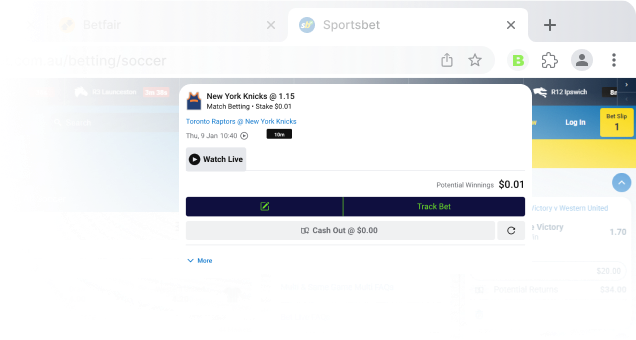
Our Chrome Extension lets you track bets directly from bookmaker websites — no copy-pasting, no switching tabs.
- Track bets as you place them, directly from betslips and betting history
- Manage your entire betting portfolio at your fingertips
- Sync bookmaker balances with one click
- Share your bets with TrackrSlips
- 30+ Australian bookmakers supported
Available with BetTrackr Premium — free for 7 days with a new account
The Best Way To Track Your Bets
Built for matched bettors. Optimise your strategy, stay profitable.
Questions & Answers
Didn't find the answer to your question? Send us an email and we will answer as soon as possible.
Contact Us- Download the Extension Files: Download the BetTrackr Chrome extension files
- Extract the Files: Extract the '.zip file' to a location on your computer.
- Open Chrome: Launch the Google Chrome browser on your computer and navigate to chrome://extensions/
- Enable Developer Mode: On the Extensions page, toggle the switch for Developer mode in the top-right corner.
- Load the Unpacked Extension: Click the Load unpacked button. In the file dialog that appears, navigate to the location where you extracted the extension files and select the folder containing the extension's source code. Click Select Folder.
- Confirm Installation: The extension should now be installed and visible on your Extensions page. You may see an icon for the BetTrackr extension in the top-right corner of the Chrome window.
- Start Using the Extension: Click on the extension icon to login and start tracking your bets on your favourite bookmaker websites!